
17 AutoCAD tools built by groundworks engineers, for groundworks engineers
Stockpile volumes without Civil 3D. As-built and NSSS steel checks that write OK or NON-CONFORM. Slab level heat maps. Concrete and mesh cubed up the way you order it. Pipe gradients every way a laser wants them. Title sheets in one click. All inside the AutoCAD you already own.
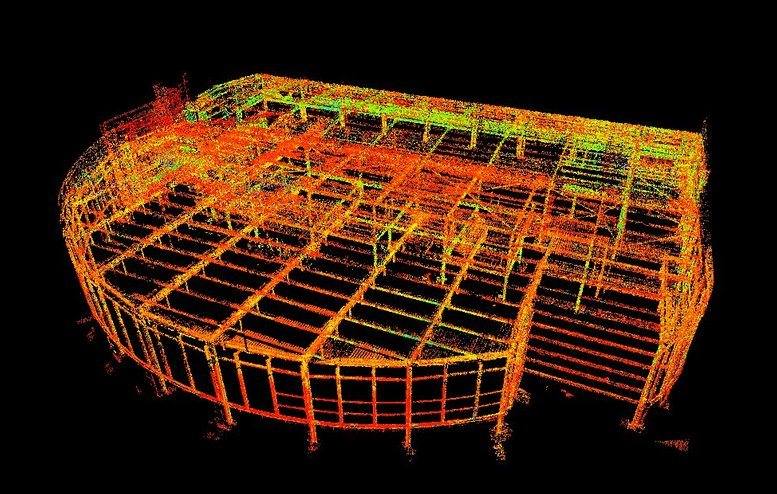
The jobs that eat an engineer's evening, done in a minute
Every one of these tools started as something we were sick of doing by hand on a live site: cubing up a foundation GA in a spreadsheet, working a steel column's plumb from two shots and a calculator, setting up yet another title sheet, turning a wall survey into an elevation the architect could read.
LL Tools runs inside plain AutoCAD: no Civil 3D, no subscription to a cloud platform, no internet connection on site. Every tool remembers your settings, writes to its own layers so nothing is destroyed, and exports CSV where it makes sense.
- One-click installer: unzip, double-click, open AutoCAD. The LL Tools ribbon tab is there.
- Grouped ribbon with hover help: Survey & As-Built · Take-off & Volumes · Drainage · Drawing & Sheets.
- A PDF manual for every tool: quick start, every option explained.
- One licence, all 17 tools: per machine, 6 or 12 months, activated by a single code.
All 17 tools
Grouped the way they sit on the ribbon. Every tool is also a typed command.
Survey & As-Built
LL As Built
Pick design, pick as-built: ΔE / ΔN / ΔH annotated in two clicks. Steel check mode tests base, top and verticality against NSSS Table 9.6 and writes OK or NON CONFORM per axis.
LLASBUILTLL Elevation
Projects a 3D wall survey onto a baseline so it reads as an elevation. Developed views for curved walls, gridlines at true chainage, datum line, section title, CSV.
LLELEVLL Slab Check
Slab survey vs design level: every point labelled ±mm, colour-coded, plus a five-band heat map with contour lines exactly where the slab leaves tolerance. Legend and counts included.
LLSLABLL Point Import
CSV survey points in as markers or blocks with labels and true Z. Layer-per-code, so the manholes can go off and the kerbs stay on.
LLPTIMPORTLL Point Export
Drawing points and survey blocks out to CSV (Ref, E, N, Z), ready for the total station or rover. Pairs with LL Circles for pile setting-out files.
LLPTEXPORTTake-off & Volumes
LL Volume
Stockpile and cut/fill volumes from 3D survey points: Delaunay TIN, exact prism integration, four base-surface options, tonnage from an editable density. No Civil 3D.
LLVOLUMELL Cube Up
Concrete order volumes from footprints: depth, waste %, rounded up to 0.25 m³ the way ready-mix is sold. Per-mix register, wagon loads, footprint hatched and labelled.
LLCUBEUPLL Mesh Up
Tiles standard mesh sheets over a slab outline with your lap, per layer. Sheet count, layout and tonnage by type: A142, A193, A252, A393.
LLMESHLL Linework
Lengths take-off for drainage runs, kerbs, ducting, fencing: run labels on the drawing, itemised summary per layer, CSV.
LLLINEWORKLL Circles
Centre marks and a numbered schedule for every circle or arc: piles, cores, columns. Ref, E, N, Z, diameter to CSV; bolt holes filtered out by radius.
LLCIRCLESDrainage
LL Pipe Grade
Pick two inverts: plan length, fall, 1-in-N, % and mm/m. Every format a laser accepts. Sanity flags for flat, steep or adverse falls. Invert register and a merchant-ready order schedule in whole supply lengths.
LLGRADELL Manhole
Enter the reference, cover level and invert level, and the depth is worked out, with the schedule and section placed in the drawing. Refs cross-reference with the Pipe Grade register.
LLMANHOLEDrawing & Sheets
LL Title
PRINT THIS: rubber-band model space and get a new layout at the right sheet size: title band filled, viewport scaled and locked, page setup matched. Plot.
LLTITLELL Stamp
Click-to-place numbering that counts up as you go (bubbles, hexagons, boxes), with optional gridline E/N call-outs. Piles, gridlines, runs, mark-ups.
LLSTAMPLL Match+
Selective match properties, including Z / elevation, the one thing MATCHPROP can't do. Tick what carries across; everything else stays.
LLMATCHLL Scale
mm ↔ m conversion of a drawing or selection about a base point, with dimensions still reading true afterwards. The survey-in-metres, design-in-millimetres fix.
LLSCALELL Pick Colour
Click one object, select everything of that colour. Recolour, isolate, re-layer or delete: exploded xrefs and messy imports cleaned up in minutes.
LLPICKCOLTen minutes, seventeen tools
Screen recordings from real drawings, no mock-ups.
Chapters for every tool are listed in the video's description. Watch on YouTube.
From purchase to first tool in about ten minutes
Buy & download
Choose a 6- or 12-month licence below. You get the LL Tools zip immediately: 17 tools, loader, manuals and installer.
Install
Unzip anywhere, double-click INSTALL.bat, open AutoCAD. The LL Tools ribbon tab is there. No CUI editing, no APPLOAD.
Activate
Run any tool. It shows your machine's Software ID. Send it to us and we reply with your activation code, usually the same working day.
Work
One code unlocks all 17 tools on that machine for the licence term. Runs offline. Settings remembered. Renew with a new code when it expires.
One licence. All seventeen tools.
Per machine, no per-tool add-ons, no cloud account. Less than one day's engineer rate.
For a single project or to try the suite on real work.
- All 17 tools
- One-click installer & ribbon
- 17 PDF manuals
- Email support
- Renew any time
A year of the full suite for less than two 6-month terms.
- All 17 tools
- One-click installer & ribbon
- 17 PDF manuals
- Email support
- All updates released during the term
For contractors and consultancies licensing several PCs.
- Everything in the 12-month licence
- Multi-machine discount
- Single invoice, PO accepted
- Priority support
Licences are node-locked to one PC by its Software ID. Moving machine? Tell us and we issue a replacement code. 14-day money-back if the tools won't run on your AutoCAD. Got a discount code? Enter it at checkout.
Plain AutoCAD, spreadsheets, or Civil 3D?
| Job | LL Tools | AutoCAD + spreadsheet | Civil 3D |
|---|---|---|---|
| Stockpile / cut & fill volumes from survey points | ● | ○ | ● |
| NSSS steel position & plumb verdicts | ● | manual | ○ |
| Slab level heat map with tolerance contours | ● | ○ | partial |
| Concrete order volumes rounded the way ready-mix is sold | ● | manual | ○ |
| Mesh sheet count, laps & tonnage | ● | manual | ○ |
| Pipe gradient in 1:N, % and mm/m + order schedule | ● | manual | partial |
| One-click title sheet from model space | ● | ○ | ○ |
| Runs on the AutoCAD you already have | ● | ● | ○ |
| Annual cost per seat | £199 | £0 + your time | £2,500+ |
● built in ○ not available "manual" you can do it, by hand, every time "partial" needs setup or add-ons
Check before you buy
Any full AutoCAD with the VBA module
LL Tools runs on any version of full AutoCAD that has the VBA module installed, including Civil 3D and other AutoCAD-based products, in their plain AutoCAD environment. If it won’t run on yours, we’ll refund you within 14 days.
Not AutoCAD LT
LT has no VBA and no LISP, so it cannot run the tools. If you're on LT, it won't work. Don't buy it.
Windows 10 or 11, 64-bit
Plus the free Autodesk VBA Enabler for your AutoCAD version, a one-time download from autodesk.com. The install guide links to it.
No internet needed
Licensing is by code, not by server. Once activated the tools run entirely offline: on site, in a cabin, wherever the laptop is.
Questions engineers ask us
Is there a free trial?
Not a time-limited one, as the tools are licence-gated from first run. Instead, the demo videos above show every tool on real drawings, and if it won't run on your AutoCAD we refund within 14 days. Want to see a specific tool on your own drawing first? Book a 15-minute screen share.
What exactly is a "machine" licence?
One activation code, locked to one PC by its Software ID, unlocking all 17 tools for 6 or 12 months. It survives uninstall and reinstall on that PC. Moving to a new laptop? Email us the new Software ID and we issue a replacement code.
How fast do I get my activation code?
Codes are issued by a person, not a robot: normally within a few working hours, always within one working day. Send your Software ID through the form below or straight to info@lleg.co.uk.
What happens when the licence expires?
The activation window simply reappears. Nothing is deleted, your settings are kept, and a renewal code puts you straight back to work. We'll email you before it runs out.
Does it need Civil 3D?
No. LL Volume, Elevation, Slab Check and the rest run on plain AutoCAD. That's the point.
Will it work on AutoCAD LT?
No. LT has no VBA or LISP support, and there is no workaround. Please check before buying.
Are updates included?
Yes. Any update released during your licence term is yours. Download the latest zip, run INSTALL.bat again, and your existing code still works.
Can I get a VAT invoice or pay by purchase order?
Online purchases come with a VAT receipt automatically. For purchase orders, multi-machine licences or a single invoice for a team, contact us and we'll sort it directly.
Send your Software ID, or ask us anything
Bought LL Tools and run your first tool? Paste the Software ID it shows and we'll send your activation code. Not bought yet? Use the same form for questions, team pricing or a demo.
Related services
Seventeen tools. One licence. Tonight's take-off done before tea.
Built and used every week by LL Engineering Group's own site engineers.